Compulsion Games (Xbox Game Studio)
Role: Technical Artist
Notable projects: South of Midnight
Engines used: Unreal 4
Platforms: Xbox Series X/S, Windows
Employment time: July 2024 – present
I got brought on to the tech art team at Compulsion Games about 9 months prior to the launch of South of Midnight to assist the tech art team with the closing process.
I contributed mainly to the rain system in South of Midnight, as well as VFX investigation tasks and performance-related investigations. I also participated in presenting studio-wide weekly presentations of the game’s performance. I’ll also be continuing to work with the team on their next title.
My contributions
South of Midnight
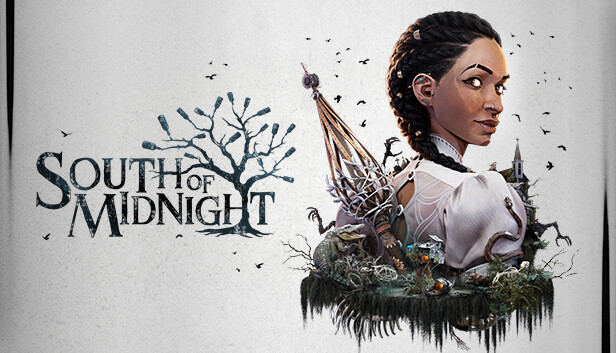
South of Midnight is an action-adventure game set in the American Deep South. It follows Hazel as she looks for her mother, meeting various creatures along the way. It’s heavily Southern Gothic inspired, and takes on stop-motion animation and hand crafted appearance.
On this project, I worked heavily on the rain system, reworking it to its current state. I also supported the tech and optimization efforts that stemmed from this topic. Moreover, I assisted data validation enforcement efforts, and helped investigate visual bugs (mostly related to VFX). Additionally, I had a hand in investigating several other performance-related issues.
The rain system
When I was brought onto the project, the rain system was already implemented in the first area of South of Midnight. It functioned very differently compared to the current version of the rain, and had also used an old version of the rain VFX. I didn’t know this at the time, but the version I saw was actually the second iteration of the rain system. I was initially asked to correct how rain direction was getting done to fix a bug, but soon, realized there was much more that needed to be done.
The intentions of the rain system/tool
There were a few visual and technical intentions of the rain system/tool. This includes the following:
Visual
- Illustrate the severity of the hurricane
- Demonstrate the growing intensity of the storm
- Direct the player (at times) using the direction of the rain
Technical
- Can be used by other teams to change the intensity and direction of the rain
- Can be completely turned off when not in use/during cutscenes
- Fit within the 16.6ms budget on the GPU to achieve 60fps
- Not rain through roofs/indoors
The process of reworking the rain system
I was initially asked to change how the rain rotated to have it work properly with the depth camera, though quickly found issues with the system itself, including the fact that it wasn’t working properly in conjunction with scripted events. Additionally, depth culling stopped working with the latest version of the VFX, even after the method of the rain’s rotation was corrected.
The first iteration, as I was told, worked a bit closer to the current system. Instead of the rain coming from above Hazel, it was a cylinder of rain that travelled together with her. The second iteration worked very differently: it tiled rain across the map; different tiles would activate based on where Hazel was at any given time. It also had a depth masking feature for rain that was supposed to help cull the rain when under roofs and ceilings.
I decided to change how the rain was done to work better with the current version of the VFX. The rain tiling that the previous rain system featured was impressive, but caused rain to not appear properly in the map. It would spawn rain really far away from the player itself and didn’t seem like it would fit the needs of the project.
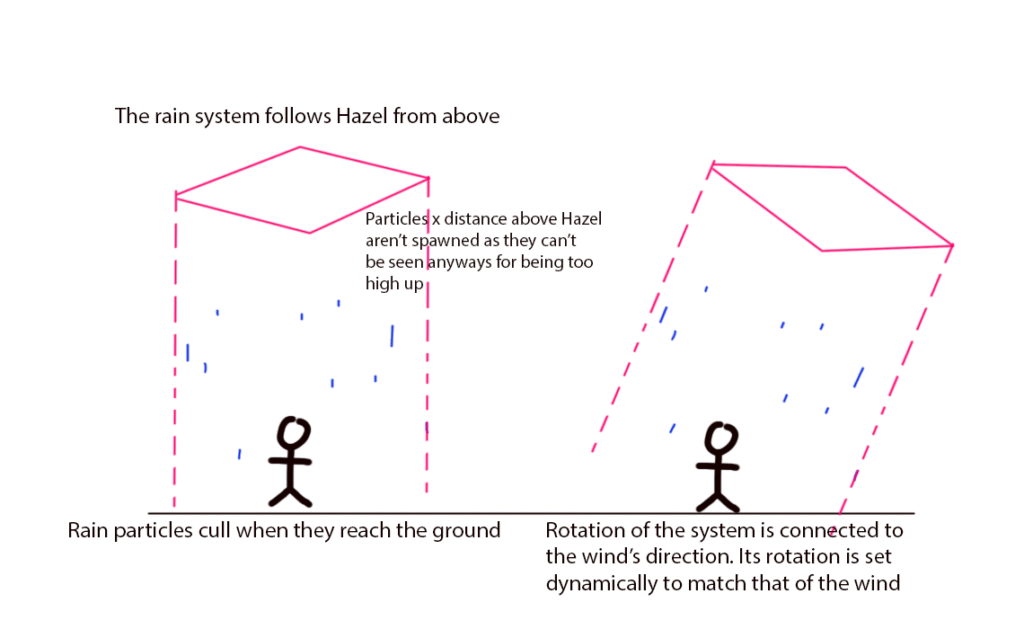
Similar to the debris in the first area of South of Midnight, the current iteration has the rain follow hazel from above, and culls once it reaches the ground. Initially depth masking (from the first iteration) was also used, but the Camera component used for depth masking took ~1ms on the GPU and was way too expensive for our needs. Ultimately, the rain was culled using kill volumes, with a weather override system supported by another technical artist on the team turning off the weather during cutscenes to give cutscene artists more flexibility.
Variables responsible for adjusting the rain’s direction and intensity were left exposed so that artists could adjust these values to work with the needs of the gameplay/artistic direction. This helped sell the intensity of the hurricane and functioned with the weather management system that helped scale the storm’s intensity as the player progresses through the first area of the game.
To have it work more seamlessly with scripted events/cinematics, another technical artist worked on creating functionality that allowed the storm effects (including rain) to be turned off during cinematics, and turn back on after the cinematics have finished. This approach allowed for the greatest amount of flexibility for artists, in case they wanted to display rain differently during the cinematic.
Addressing issues regarding the rain’s performance
There were two main issues with the rain’s performance: the cost of the translucency pass of the rain (both during cinematics and during play), as well as the cost of the camera component used for depth masking. The issue with rain performance during cinematics was less of an issue where it was decided that cutscenes would run at 33.33ms.
The heaviness of the rain could be seen using the shader complexity view in UE4, and was confirmed from PIX captures. At its worse, the rain’s transparency pass took ~5-6ms from the 16.6ms budget we had to spend.
Part of the problem was related to the shader itself: it was sampling a normal map when its additive quality couldn’t read the data on the map. Getting rid of it took out ~0.8ms. There was also too much rain and the effect was scaled too much around Hazel. Scaling down the droplet amount + tightening the effect area helped greatly. An issue that came from making the effect space smaller was Hazel potentially travelling outside the range of the rain when running. This was overcome by shifting the rain to be slightly in front of Hazel at all times.
Lastly, to combat the overdraw issues we had, a VFX artist helped greatly by splitting the rain effect into two emitters: One emitter would feature rain cards, whereas the other emitter would feature smaller, rain drop-sized particles. Doing this helped greatly with the performance of the rain.
Data validation
The goal of Data Validation for South of Midnight is to ensure that assets within the project fit both technical (e.g. vert count, texture sizes) and organizational (e.g. asset names, source files) expectations. By the time I got brought onto the project, the validator scripts were already in use. These scripts ran every morning, combing through the project in search for assets that were not conforming to the guidelines. Artists would then be able to view their list of assets to adjust and resubmit.
My contribution towards these efforts included:
- Providing clarification on why certain assets may have ended up on the data validation list
- Reviewing artist requests to add certain assets to the exceptions list
- The validator for vert count provides a suggested vert count for each asset based on the asset’s scale. At times, the suggested vert count is not possible for the asset; either it’s too low for what the asset is, or the asset is an interactable and can be viewed at a close distance
- If this is found to be the case, the asset would be added to the validator’s exceptions list, so that the validator will stop flagging that particular asset the next time it runs
- The validator for vert count provides a suggested vert count for each asset based on the asset’s scale. At times, the suggested vert count is not possible for the asset; either it’s too low for what the asset is, or the asset is an interactable and can be viewed at a close distance
- Adding verified assets to the exceptions list
VFX visual bug investigation
There were a few visual bugs that came up during my time working on South of Midnight. It’s funny as investigating these bugs really reminded me of my time at Gameloft Toronto and The Beans Team as at both companies, a lot of my time was focused on VFX-related tasks.
Notable VFX bugs I investigated were as follows:
- Various VFX were visible on play in editor (PIE) but aren’t visible in Xbox
- This was an odd but pressing issue as VFX that were missing were important effects used to visualize health pick-ups and ground area of attack. The pickups could still be picked-up, meaning that this was an issue strictly related to VFX
- Investigation approach:
- To rule out whether it was a material change that may have caused this issue, I tracked down the CL where this bug was first found and noticed that there was no correlating material change made at that time that may have caused this issue
- Along with another technical artist and our producer, we tested a number of builds to track down exactly when this bug was created. It was found to have been caused a few months prior to its discovery
- Using P4V, I investigated previous iterations of the VFX and related NS/materials. Unfortunately, I didn’t notice anything out of the ordinary. During this time, I created a testing gym and had it added to the build so it would be easier and faster to test these VFX
- An engine programmer also noted that there were cook errors related to these (and several other) VFX. We book a meeting to share notes
- Result from investigation: Working together with the aforementioned engine programmer, the cook logs pointed towards a compilation error mentioning the Node:Draw Sphere Persistent pin as well as a Debug interface. With that, I determined that the issue was caused by the sphere debug being enabled for one of the emitters of the NS. For whatever reason, this caused an issue with the VFX cooking.
- This was an issue for debug draw box location too; there was another VFX that suffered from the same problem.
- Solution: Disable any debug nodes present in any of the emitters
- Odd flickering occurring during the final boss fight
- There would be a strobing kind of flashing effect during the last boss fight
- Result from investigation: It was found that the camera component of the rain system triggered this kind of bug
- Solution: Because of the amount of time we had left, we decided to rework the rain to simply not include the camera component. There was another issue (mentioned in the above section) where it was found that the camera component took way too much from the 16.6ms per frame budget. Reworking the rain this way therefore got rid of two birds with one stone
- VFX flickering when using the main attack
- This bug was found when trying to replicate the previous issue listed. It was triggered when spamming the basic attack while
Notable performance investigation: Batching efficiency
Although most of the performance-related issues I investigated were related to the rain, a notable topic I investigated was related to batching efficiency. In our numerous performance meetings involving mainly the tech art and core engine teams, we found that batching didn’t appear very efficient. Assets that look like they should be batched weren’t getting dynamically instanced together. Understanding why that is, and passing this learning to the art team was important, as it would give the artists a better idea of what kind of environment setup might directly influence how well an area of the game is performing.
Dynamic batching should be working automatically for assets that share exactly the same material(s) and static mesh. If assets share the same static mesh but have numerous identical materials, these assets would be batched; one draw call per material. We were finding that this doesn’t occur for all assets. In PIX captures, we were able to find that assets batched more efficiently in the PrePass than the BasePass.
Investigating this was tricky; before being able to find answers, it felt like it there were numerous things that could’ve caused things to not batch: possible texture mismatch even though they appeared to be the same, non-uniform scale, etc. . What really helped was setting up a testing gym and placing assets down, creating a preflight build, then taking a PIX capture of the assets to see what gets batched. Using this method, I was able to see that assets at different distances from the camera batched differently. Following this route, I was able to conclude that assets with different LODs weren’t getting batched together as they were drawn as different assets despite sharing the same static mesh and materials. Here was the breakdown of what we found:
- Assets that share the same static mesh and material(s) get batched if they share the same LOD. This results to numerous batches of the same asset
- Lightmap type has an influence on batching: assets that don’t share the same light map type don’t get batched together
I also found that an asset’s non-uniform scale doesn’t affect batching efficiency. Previously, it was believed that assets that don’t have uniform scale would be drawn as a completely new/different asset, resulting to it not being batched. This was found to be incorrect.
Wrapping up South of Midnight
Towards the last 2 months of the project, the team was working hard to wrap up on-going optimization efforts. Personally, I found myself heavily involved with the first and last areas o the game, as they weren’t performing as well as intended. Both areas were render thread bound, which in some ways, wasn’t very surprising: the first area featured a huge forest with water/water vfx and rain. The last area simply had many VFX and draw calls.
Myself and another technical artist focused on looking at the river run section of the first area, as that was the part that had the biggest hitches. Forcing numerous trees to LOD5 and optimizing the water VFX’s material and NS helped a lot with these problems.
In terms of the last area, I was mainly working on tightening cull distances for the antique shop prior to Hazel reaching Mojo Town. Through investigating that, I found that HLODs weren’t correctly set up, meaning that areas of the main town were drawn while the player was still inside the antique shop, adding lots to the draw calls. It was also found that rain was still active evening through it wasn’t visible — I worked to fix it so it wasn’t the case anymore. The HLODs were adjusted by another technical artist while I simultaneously looked at performance issues in the first area.
One of the last hurdles of the project were fixing the popping issues that came out of building the HLODs and lights for the first time. Fixing the visual bugs that came out of the built HLODs was a huge effort by the tech art team. Given how pressed we were on time, I’m extremely proud of what we were able to accomplish.